

Thunderpick’s update brings a complete revamp to the popular Casino game Thunder Crash – a new betting panel, proper Autobet mode, provably-fair tooling, and a fresh new look. Alongside that we’re brining out smarter provider listings, four new betting calculators, stronger self-exclusion safeguards, and quality-of-life fixes across the Sportsbook.
Full breakdown below.
Patch Contents
Casino
Thunder Crash: Full Revamp
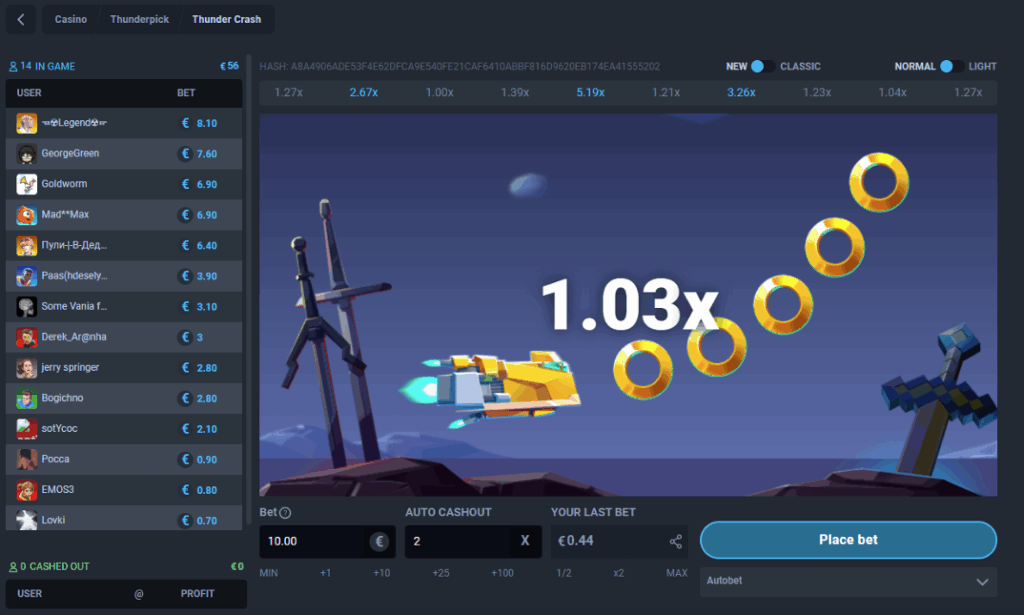
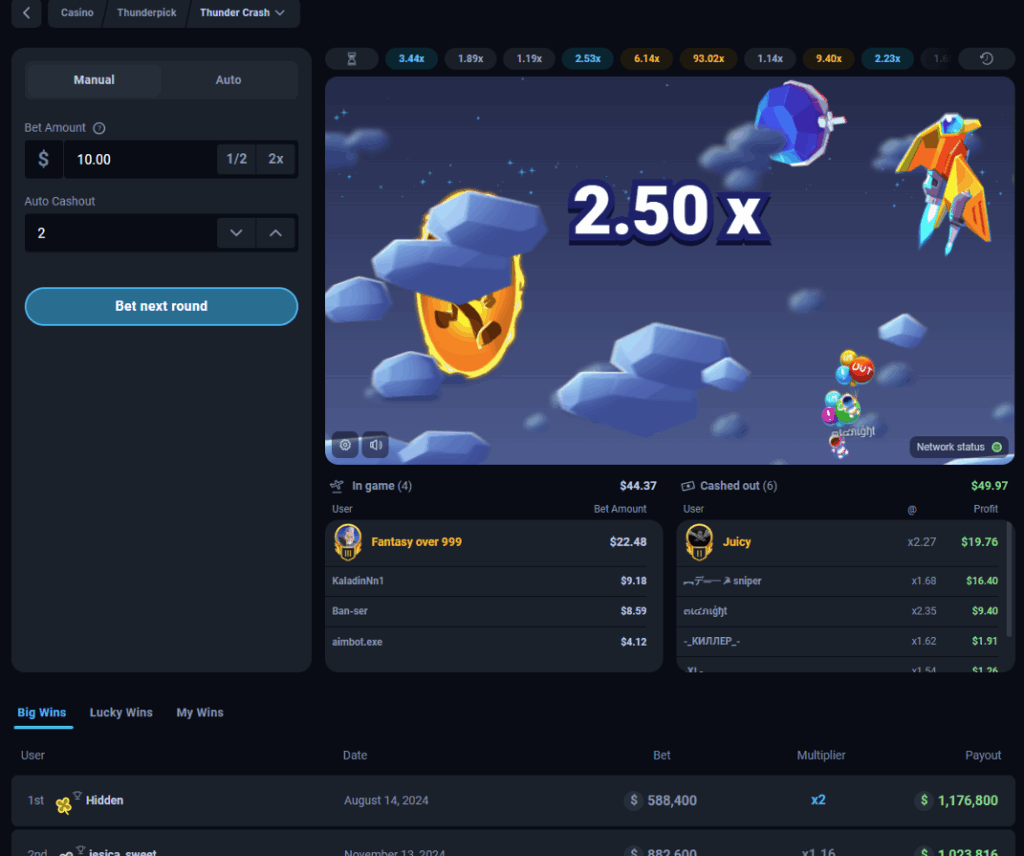
Thunder Crash has been rebuilt with a new betting panel, dedicated Autobet mode, refreshed visuals, and a stack of new tools.
Old Version:
New Version:
Betting Panel
- NEW Panel moved from a horizontal layout to a vertical stack on the left of the canvas, with a Manual/Auto toggle at the top
- NEW Bet field now shows a currency prefix, “1/2” and “2x” quick-adjust buttons, decimal entry, and a tooltip for max possible profit
- Bet validation: amounts outside the min/max limit get a red border and explanatory tooltip, and auto-correct when you leave the field; the Bet button stays disabled until the amount is valid
- Auto Cashout field: set the multiplier your bet cashes out at automatically, adjustable with stepper arrows, defaulting to 2.00x
- The main action button now updates dynamically — Place Bet, Bet Next Round, Starting, Cancel, a live “Cash Out {amount}”, and Cashed Out — always matching the current game state
Autobet (New Auto Tab)
- NEW Set a bet amount, auto-cashout multiplier, and number of rounds — or switch on Infinity mode to run until stopped
- NEW An Advanced toggle unlocks On Win / On Loss strategies: reset your bet or increase it by a percentage
- NEW A Start/Stop control (with an animated icon) runs the session; it stops automatically at your round limit or on insufficient balance, and all fields lock while it’s running
Visuals
- Multiplier, countdown timer, and crash result (“Crashed @X.XXx”) have been restyled with text shadows for readability
- Cashout results now display directly on the canvas instead of as a toast, and a live pill shows your current potential profit while a bet is open
Player Lists
- “In Game” and “Cashed Out” lists have moved from the side panel to a two-column layout below the canvas, with counts and totals per column and a highlighted avatar for the top bettor
Provably Fair
- NEW A colour-coded bar of recent multipliers
- NEW Full Crash History (last 50 rounds, paginated), individual Round Details, and hash/salt/random values with copy-to-clipboard — all available from dedicated modals
Connection Monitoring
- NEW A status dot shows connection health (green = stable, orange = degraded, plus a disconnected state); betting is blocked on a degraded connection
- NEW A full disconnect replaces the canvas with a “Network connection error” screen and a Refresh button; any running Autobet session is stopped safely with a notification
Discovery & Settings
- NEW Big Wins, Lucky Wins, My Wins, Recent Winners, Recommended, Search, and Providers sections added below the game, matching other game pages
- NEW A Crash Settings modal for Display Mode (Standard/Light) and Theme (Classic/Modern), saved per account
- NEW Distinct bet, cashout, and crash sound effects, on by default with a mute toggle in the bottom-left corner
- NEW Player engagement ranks now show on in-game events (hidden automatically in privacy mode)
Provider Tiles Now Show Full Game Libraries
Provider tiles on the casino home slider and full providers page now display each provider’s total worldwide game count (e.g. “250 Games”) for every player, rather than a number limited to what’s available in their country. Tile availability is still geo-based — providers with nothing playable in your region stay disabled with a “not available” overlay — but the count itself is now consistent for all players.
Self-Exclusion Now Extends to New Game Categories
This fix closes the gap where newly introduced Casino game categories could be switched on by default for players who’ve already excluded themselves from casino products. Going forward, a casino exclusion covers new categories automatically, rather than needing to be applied to each one separately.
Sportsbook
New Betting Calculators
The calculators page has been updated with four new calculators:
- Round Robin Calculator
- Dutching Calculator
- Kelly Criterion Calculator
- Hold Calculator
Live In-Play Event Counters
We’ve updated the Live In-Play page to now show counters for the number of events in each category, you can now see all of the action without opening every tab.
Match List Display Settings, Now in One Neat Place
Updates to the match list page display settings now place – odds format, table vs. standard view, odds animation, and more, all grouped together in a single settings modal, with each option clearly labelled.
Match Stats Expanded
Matches with Data.bet stats now carry a stats indicator on the match list page, the same way Oddin-sourced matches already do. It’s now easier than ever to spot which games have detailed stats before you click in.
Quality of Life
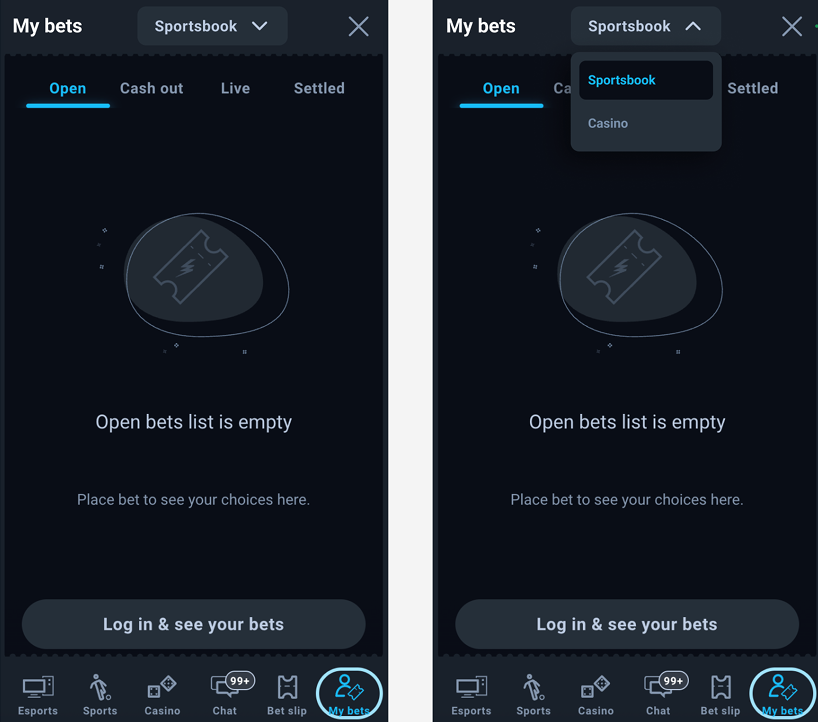
“My Bets” Filter by Product on Mobile
Mobile received an update, now when you access the the My Bets Section there is a dropdown which allows you to filter between Casino and Sportsbook bets. Your choice is also remembered the next time you open My Bets.
Bug Fixes
- The “Pistol Round {round} — Winner, Map {map}” market now appears correctly under the “Map” group instead of “Match”
- The stats window no longer shows up empty — it now only appears when stats data is actually available
That’s a full rundown of Patch 26.8 of Thunderpick. As always be sure to be in touch on socials and in our community chats if there’s any changes you want to see in future patches!