
VALORANT is available across both PC and consoles, but that doesn’t necessarily mean all players can enter the same lobby. Since launching on PlayStation 5 and Xbox Series X|S, Riot has set strict boundaries for cross-platform matchmaking. But where exactly have they drawn the line?
In this guide, we’ll explain how VALORANT crossplay works, which platforms can play together, what carries over through cross-progression, and highlight important requirements and restrictions between PC and console.
VALORANT Crossplay Explained: Consoles Together, PC Separate
VALORANT supports crossplay, but it is limited to PlayStation 5 and Xbox Series X|S. This means console players can queue together, join parties, and play in the same matchmaking pool.
However, PC and console players are restricted to separate matchmaking pools to preserve competitive integrity. The primary reason is that mouse-and-keyboard setups have inherent advantages over controllers, including superior crosshair placement, directional movement, and weapon recoil control.
It’s also important to note that console crossplay is enabled by default, with no in-game setting to toggle it on or off. While this means you can play with friends on other consoles without changing any settings, your region and distance from the server can still affect connection quality and latency.
Console Crossplay on PS5 and Xbox: How It Works
PlayStation 5 and Xbox Series X|S players share the same matchmaking pool in VALORANT. This allows them to team up with friends, queue for matches, and communicate through the in-game chat without having to play on the same system.
Since crossplay is enabled by default and there’s no setting to disable it, PlayStation and Xbox players are automatically grouped. This creates a larger matchmaking pool, which can lead to faster queue times and more balanced skill-based matchmaking across console platforms.
Even so, your platform privacy settings may still restrict who can add, invite, or communicate with you. For example, Xbox has system-level permissions that can block cross-network play entirely. To manage these settings:
- Press the Xbox button on your controller.
- Go to Profile & system > Settings > Account.
- Select Privacy and online safety > Xbox privacy > View details & customize.
- Open Communication and multiplayer.
- Set the You can join cross-network play option to Allow.
VALORANT Cross-Progression and Account Linking
VALORANT supports cross-progression, which allows you to use the same Riot Account across PC, PlayStation 5, and Xbox Series X|S.
As a result, nearly all account content is shared across any supported platform you log into. The only exception is your ranked progress (i.e., your rank medal and matchmaking rating), which is platform-specific and does not transfer between PC and console.
Here’s all the shared content between PC and console in VALORANT:
- Account level
- Currencies (Valorant Points, Kingdom Credits, Radianite Points)
- Recruited or unlocked Agents
- Weapon skins
- Battle Pass
- Battle Pass progression
- Mission progression (Dailies, Weeklies, etc.)
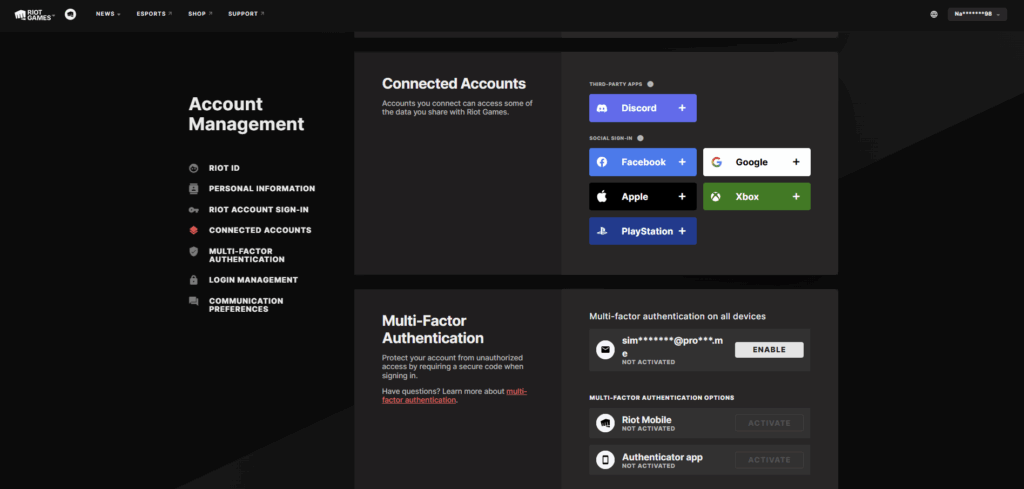
Importantly, cross-progression is enabled automatically once you link your PlayStation Network (PSN) or Xbox account to your Riot Account. However, you can also set it up manually via the Riot Account Management web page:
- Log into your Riot Account.
- Go to Account Management > Connected Accounts.
- Select PlayStation or Xbox (depending on your console).
- Log in with your console account to complete the linking.
Note: You can only link your PSN account to one Riot Account. This action is irreversible, as you will only ever be allowed to reconnect that same account.
ft. Riot Games
Platform Availability and Console-Specific Rules
VALORANT is available to play on PC, PlayStation 5, and Xbox Series X|S, with cross-progression supported across all platforms. VALORANT Mobile has launched in China, with a wider global release still pending.
According to Riot, VALORANT on console was “built from the ground up” to give console players “the best possible version of the game on their preferred platform.” For this reason, native mouse and keyboard inputs are not supported, while attempts to bypass the restriction through hardware spoofing can result in a ban.
PlayStation or Xbox players are instead expected to use standard controllers, with third-party options allowed but not officially supported. To make playing VALORANT on controller feel natural, Riot added special console-specific features and aim assist tuning.
The most notable example is Focus mode. Instead of traditional hipfiring, Focus mode temporarily lowers your sensitivity for more precise hip-fire-style aiming.
Getting Started on Console: Regions, Requirements, and Downloads
To play VALORANT on console, you must meet the following requirements:
- You must live in North America (NA), Europe (EU), Japan (JP), or Brazil (BR).
- Your account must be in good standing (i.e., have no current bans or suspensions at either the VALORANT or Riot Account level).
- You must own an Xbox Series X|S or PlayStation 5.
If you meet these requirements, you can download and install VALORANT from the Xbox Store, PlayStation Store, or the platform selection page, which will direct you to the relevant store pages. Once installed, you simply need to log into the game with your Riot Account to access your shared progression.
Open Beta to Launch: What Carries Over on Console
VALORANT console is available to play on PlayStation 5 and Xbox Series X|S consoles in the North America, Europe, Japan, and Brazil, though this is subject to change.
Before VALORANT console launched on Aug. 2, 2024, Riot conducted limited and open beta playtests, with access to the initial limited beta requiring an invitation code. During this period, account progress and purchases carried over to the release version, provided they were linked to the same Riot Account.
Since the game’s release on PlayStation 5 and Xbox Series X|S, Riot has put a strong focus on maintaining a native console experience, introducing controller-focused features like Focus mode, aim assist tuning, and platform-specific improvements and gameplay updates.
In the “Bringing VALORANT to Consoles” Dev Diary, Riot’s development team mentioned that they didn’t want console players to feel like they were receiving “a watered-down version of the game or something that didn’t meet the same level of competition and mastery” as the PC version.
To achieve this, Riot’s Gameplay Analysis team (which included former professional players with experience in both VALORANT and console shooters) provided “nuanced, detailed feedback” that enabled them to “dial in the game.”
Support and Bug Reporting for Console VALORANT
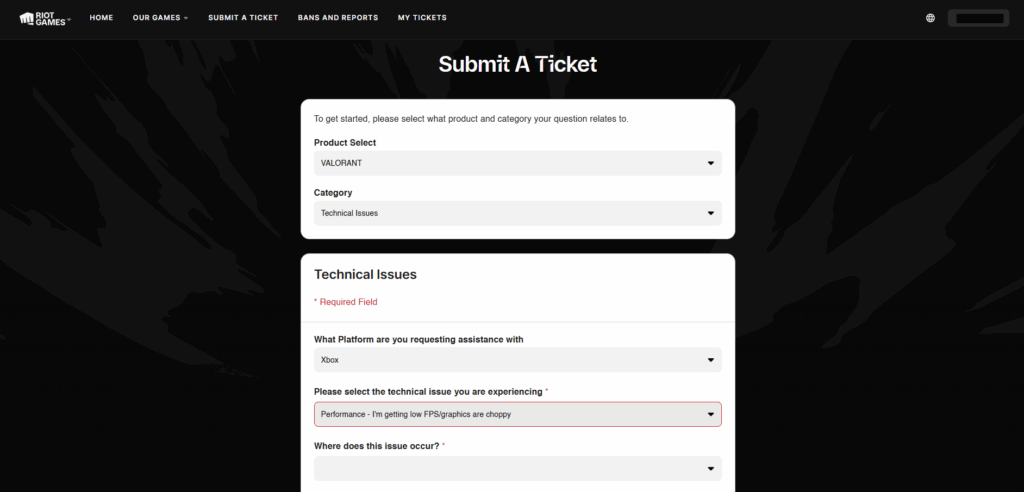
If you run into any problems with VALORANT on console, the most practical solution is to contact Riot Support. This applies to minor problems like visual glitches, but also to serious issues, such as game-breaking bugs, crashes, or exploits.
To report a bug, you must submit a ticket using the QR code in Help or Support, ensuring that you:
- Explain what you were doing when the problem happened.
- Mention where the problem occurred (e.g., the lobby, Agent select, loading screen, or in-game).
- Include your Xbox gamertag or PSN ID.
- Provide any game logs if Riot Support asks for them.
If you cannot submit a ticket from your console, you can also report bugs or account-related issues directly through the official Riot Games Support portal via the web. Just be sure to check the Riot Status page for any known issues before requesting help.
ft. Riot Games
Ranked, Pro Play, and Cross-Platform Considerations
VALORANT ranks do not transfer between PC and console because matchmaking ratings are separate for each platform.
PC and console players are separated into different matchmaking pools to control for the mechanical differences between mouse-and-keyboard and controller setups. Consequently, your skill rating is evaluated solely against opponents using the same input method, meaning you can be Platinum on PC and Diamond on console (or vice versa).
Here are some things to remember when playing ranked in VALORANT:
- Team coordination matters more than raw aim. At higher ranks, most wins come from synchronized execs, util usage, and crossfires that aim alone cannot overcome.
- Maintain clear comms, trade with teammates, and use abilities with purpose to stabilize rounds, especially when your team is inconsistent.
- Avoid uncoordinated aggression so you don’t inadvertently feed the enemy economy and map control. Instead, play with your team and stick to the game plan.
- Take accountability for both wins and losses, and don’t blame your teammates for your poor decisions. Instead, own your mistakes and keep your ego in check.
- Try to play on server nodes closest to your location (aim for <45 ms ping) to ensure your inputs register as intended and to avoid desync from ruining your games.
ft. Riot Games, Valorant
Can A High-Skill Ascendant+ Player Hang In Pro Play?
While an Ascendant player may have strong game sense and mechanical mastery, individual skill is rarely enough to “hang” with VALORANT pros.
Even with strong macro play and coordination, there is a HUGE difference in team execution, rotations, utility lineups, decision-making, and mid-round adaptability between ranked and professional games. In high-rank lobbies, players react to what they see, but in pro play, teams punish you for mistakes you haven’t even made yet.
That said, highly analytical Ascendant+ players could realistically make great coaches, analysts, or in-game leaders. These players could also support or even lead Tier 3 or academy teams, especially as an IGL calling executes and adjustments. Still, most teams prefer Immortal or Radiant players for their credibility.
Possible Future Crossplay Options to Watch
Riot has not announced any plans to introduce crossplay between VALORANT on PC and console.
Although it’s not confirmed, optional PC-console queues, input-based matchmaking, or special cross-platform custom lobbies could be introduced in future updates. For now, though, only PlayStation 5 and Xbox Series X|S players can play together, while PC players remain separated from the matchmaking pool.
ft. Riot Games, Valorant
VALORANT Crossplay FAQ
Not sure about something? Here are some frequently asked questions (FAQs) about how crossplay works in VALORANT.
Does VALORANT Support Crossplay?
Yes, but it is limited to only PlayStation 5 and Xbox Series X|S players. Xbox players can play with or against PlayStation players, but not PC players.
Is There An In-Game Crossplay Toggle On Console?
No. Crossplay is enabled by default on consoles, and there is no in-game setting to disable it.
Can I Play VALORANT On PC With Friends On Console?
No. VALORANT does not support PC-to-console crossplay. PC and console players are kept in separate matchmaking pools to preserve competitive integrity and fair play.
What Platforms Support VALORANT?
VALORANT is available to play on PC, PlayStation 5, and Xbox Series X|S. A mobile version has already launched in China, but the rest of the world will have to wait.
What Carries Over With Cross-Progression?
Your VALORANT account level, currencies (e.g., Valorant Points, Kingdom Credits, Radianite Points), recruited Agents, weapon skins, Battle Pass progression, and mission progression (Dailies, Weeklies, etc.) are shared across PC and console.
Is My Rank Shared Across Platforms?
No. VALORANT console and PC players have platform-specific ranks and matchmaking ratings.
How Do I Enable Cross-Progression?
Cross-progression is enabled automatically after you link your Riot Account to your PSN or Xbox account.
Which Regions Can Access VALORANT On Console?
VALORANT console is currently available in North America, Europe, Japan, and Brazil.
What Do I Need To Play On Console?
To play VALORANT on console, you must own a PlayStation 5 or Xbox Series X|S, have a Riot Account in good standing, and live in one of the eligible regions (NA, EU, JP, or BR).
Can I Use A Keyboard And Mouse On Console?
No. VALORANT console is intended to be played with a controller. Keyboard and mouse are not supported. Any attempts to use them can result in a ban.
Will My Open Beta Progress And Purchases Carry Over To Launch On Console?
Yes. VALORANT has a shared inventory and progression across PC and console. As a result, any purchases or progress made during the open beta transferred to the release version.
How Do I Report A Console Beta Bug?
You can report a console bug using the QR code to submit a ticket via Help or Support. In your ticket, explain what happened and where, include your Xbox gamertag or PSN ID, and provide game logs if requested.
Can I Play Across Regions?
No. You generally cannot party or matchmake across separate regional shards. You can only play on shards within your server region.
Always practice Responsible Gambling and check out our latest promo offers and boosts. T&Cs apply. 18+ to play.