

Take your conversations to another level with our new and upgraded Thunderpick Chat features. With some feedback from our most seasoned chatters, we’ve got a new look for those of you that like to chat on-site.
Table of Contents
New and Unread Messages
Scrolled up to catch a message you missed? click straight back down to the most recent chat message with the click of a button. Unread messages will show with a badge counter like any other chat client, so you know how many messages have been posted while you’re away.
Emojis and Replies
Emojis have had an update, the new picker supports custom emoji sets and lets you quick pick from your recently used. To access, click the emoji button and filter through tabs from your standard smileys to more custom ones based on Pepe and other memes. Used to Discord emojis? No problem, you can input the code for emojis with text by using :emoji-text-here: like you would on Discord. eg. :fire: for the 🔥emoji. Give it a try!
Spice up your chat with Markdown Syntax
In addition to being able to use :emoji-text-here: you can also change your text typing for bold, italic, strikethrough, underline, and inline code (if you ever need it.)
| Format | Markdown Syntax | Keyboard Shortcut |
| Bold | **text** or __text__ | Ctrl + B |
| Italic | *text* or _text_ | Ctrl + I |
~~text~~ | Ctrl + Shift + X | |
| Underline | Ctrl + Shift + U | |
Inline Code | `text` |
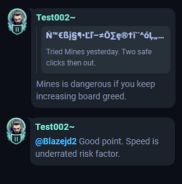
Replies have had an update too, allowing you to chain replies easier. Use the Hamburger menu and click reply, your message will show that it’s replying to @username. Speaking of @ messages, you can now mention users by typing their @username, as well as @admins if you need to contact one.
We’ve also cleaned up on-site links, want to share Thunderpick markets or blog articles? They’ll shorten down to a shortened, clickable button. External links will remain as a standard link.