
Despite being one of the world’s most popular tactical shooters, VALORANT is not natively supported on macOS. Shocking, right? However, Intel-based Mac users can still join the action using workarounds, but only if they’re willing to spend time setting up a dual-boot Windows environment.
This guide will cut through the confusion and explain how to play VALORANT on Mac, detailing step-by-step instructions for setting up Boot Camp, hardware limitations, blocked workarounds, performance tips, and even a few Mac-friendly alternatives you can try.
Is VALORANT Playable on Mac? (Read This First)
No, VALORANT is not officially supported on macOS, meaning you can’t play it natively on a Mac as you would on a Windows PC.
That said, Intel-based Macs can still play the game by using Apple’s built-in Boot Camp Assistant to dual-boot into a native Windows environment. The catch is that this workaround is not possible on Apple Silicon Macs (with M1/M2/M3/M4/M5 chips).
Riot’s Vanguard anti-cheat runs at a kernel level and explicitly blocks virtualized or streamed environments. As a result, it’s not possible to play VALORANT via cloud gaming services or virtualization tools because Vanguard can’t get the low-level hardware access it needs to verify the system properly.
There is no safe or official method to play VALORANT on Apple Silicon Macs, and Riot hasn’t revealed any plans to make the game available on macOS anytime soon.
Running VALORANT on Intel-based Macs via Boot Camp
While you can’t play VALORANT on Apple Silicon Macs, Intel-based Mac users can download and play VALORANT by installing Windows through Apple’s Boot Camp Assistant.
Using this utility, you can bypass the restriction by creating a dual-boot setup, so you can start your Mac in Windows and play VALORANT as if you were using a PC. However, your Mac must have an Intel processor. Apple Silicon models will not work because Boot Camp is not available on those systems.
In addition, your Mac should have at least 64 GB of free storage space, although more is strongly recommended. If your Mac uses an Apple T2 Security Chip, check that Secure Boot is also set to Full Security before you begin.
Here are the steps to install VALORANT on Mac using Boot Camp:
Creating The Windows Installer
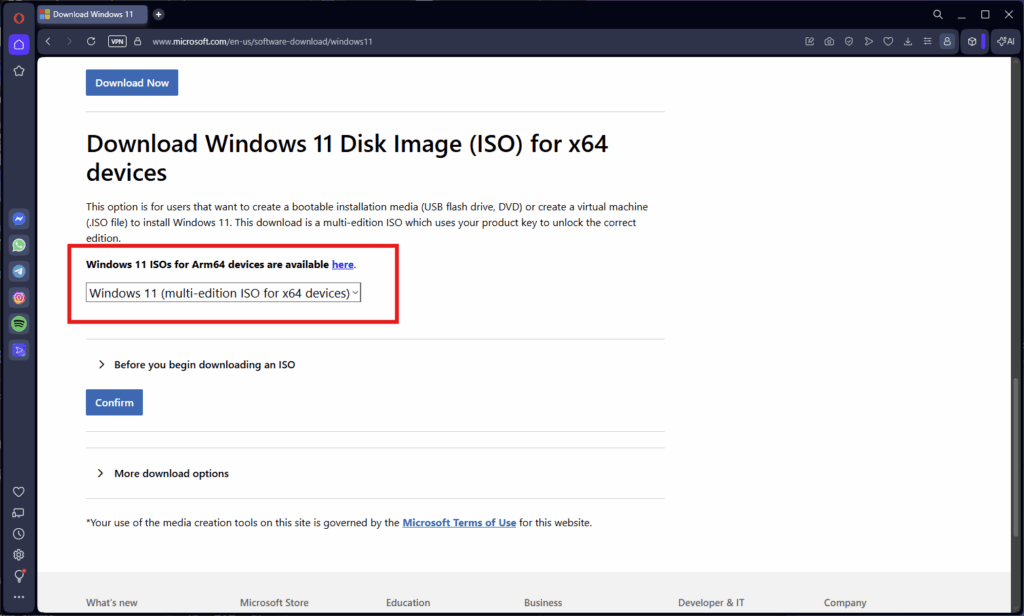
- Go to Microsoft’s official website.
- Download a Windows 10/11 64-bit ISO disk image.
Note: Windows 11 is not officially supported on Apple’s Boot Camp, as most Intel Macs lack the required TPM 2.0 security chip. To avoid complications, we strongly recommend proceeding with a Windows 10 ISO.
- Press ⌘ + Space
- Search for Boot Camp Assistant and launch it.
- Press Continue at the introduction screen.
- Check “Create a Windows 10 or later install disk.”
- Check “Install Windows 10 or later version.”
- Press Continue.
Note: Many Intel-based Macs use a driverless Boot Camp setup. However, older models may ask you to insert a USB flash drive during installation. If prompted, use an empty drive with at least 16 GB, as formatting will permanently erase all existing data.
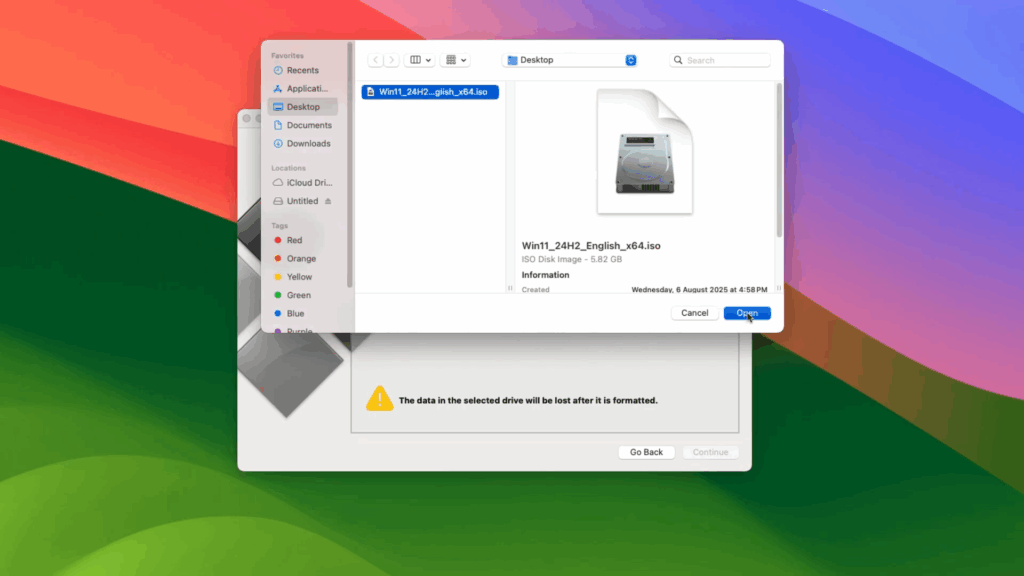
- Select the Windows ISO image you downloaded (and the USB drive, if prompted).
- Press Continue.
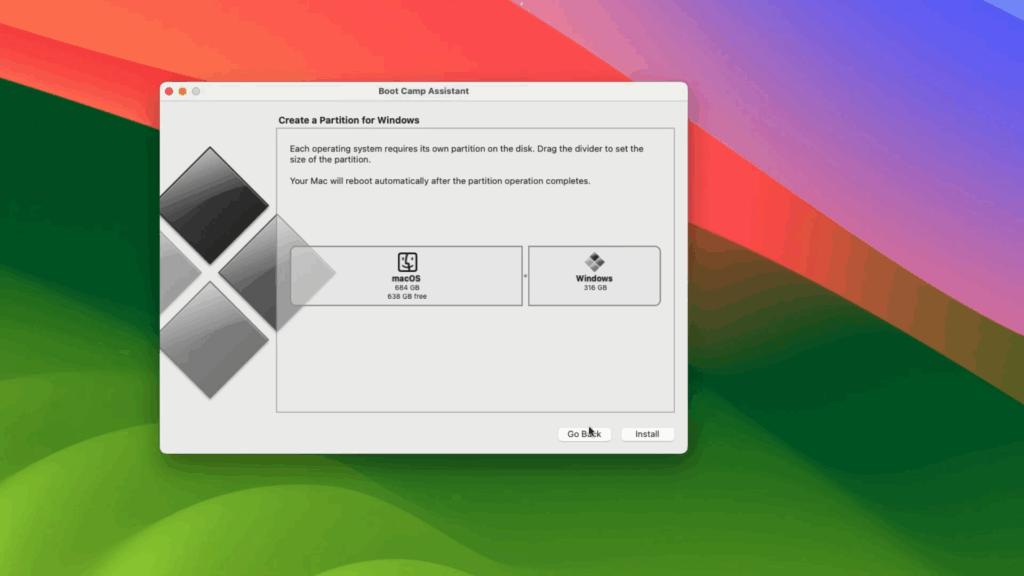
- Set the Windows partition size.
- Click Install.
VALORANT requires roughly 28 GB of free storage. However, extra space is required for the Windows installation, as well as Riot Vanguard, graphics drivers, and future patches and game updates. For this reason, we strongly recommend allocating at least 128 GB to the Windows partition.
Installing Windows With Boot Camp
During the installation process, Boot Camp will partition your disk and install Windows alongside your existing macOS installation. Your Mac should automatically restart and boot into the Windows installer.
When it begins, follow the setup instructions and make sure you select the BOOTCAMP partition when prompted.
When the installation finishes, the Boot Camp installer should launch automatically to install Mac support drivers required for hardware compatibility. If this doesn’t happen automatically, you need to run the installer manually by locating the BootCamp folder and running setup.exe.
Installing VALORANT and Vanguard
Now, all that’s left is to:
- Check for Windows and graphics drivers updates.
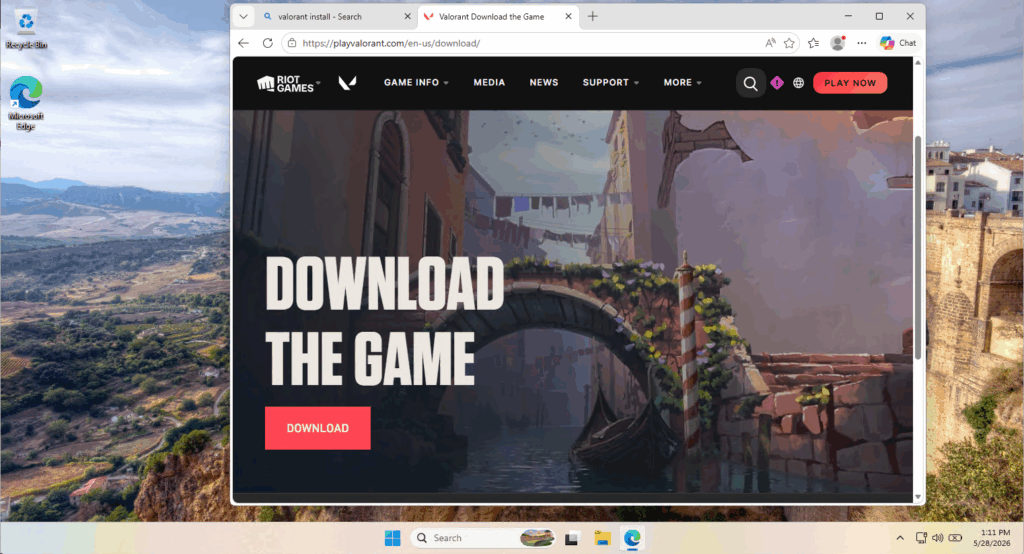
- Download VALORANT from Riot’s official website.
- Install VALORANT and Riot Vanguard, then restart if prompted.
- Launch the game from Windows and adjust your settings for optimal performance.
VALORANT should run exactly as it would on a Windows PC. The only difference is that you’ll have to boot into Windows to play it. To switch between Windows and macOS, press and hold the Option (or Alt) ⌥ key at startup, then select the operating system you’d like to use.
Disclaimer: All system modifications and installations are performed entirely at your own risk. Ensure you back up important files before proceeding, as incorrect changes can cause system instability or irreversible data loss.
Why VALORANT Doesn’t Support Apple Silicon Macs
The main reasons Apple Silicon (M1/M2/M3 and new M-series models) cannot run VALORANT via Boot Camp come down to (i) differences in chip architecture and (ii) virtualization limits imposed by Riot Vanguard.
#1. Chip Architectural Differences
Intel-based Macs rely on the standard x86-64 architecture, sharing the same language used by Windows PCs. This allows Apple’s legacy Boot Camp utility to easily partition a drive and run Windows natively on the hardware.
By contrast, Apple Silicon chips use the ARM64 architecture, which is based on an entirely different instruction set that’s physically incompatible with x86-64 Windows installations.
#2. Virtualization Limits
Even though Apple Silicon Macs are technically capable of booting ARM-based operating systems, they do not support Boot Camp. As a result, users cannot install and run Windows natively in the same way they could on Intel-based Macs.
This restriction means Apple Silicon Mac users are forced to use virtual machines like VMware or Parallels to run virtual versions of Windows instead of native dual-boot setups. However, the problem is that virtualization is not compatible with Riot Vanguard.
This is because: Vanguard anti-cheat operates as a kernel-level driver on Windows to detect unauthorized software. As such, Vanguard explicitly blocks virtualized environments because the hypervisor (the software layer sitting beneath the virtual OS) can hide cheats or spoof hardware IDs to bypass bans.
- Apple heavily restricts third-party kernel extensions (KEXTs) in macOS for security and system stability. However, since macOS denies the system-level access Vanguard requires, a native version simply cannot function properly.
Because Vanguard cannot function without direct hardware access, it also cannot be hosted on virtual server blades. As a result, many cloud gaming providers don’t offer VALORANT in their gaming catalogs, leaving Apple Silicon users with no reliable way to play the game on Mac.
Even worse, attempting to bypass Vanguard may also put your Riot account at risk. This means the only realistic options are to use an Intel Mac with Boot Camp, switch to a Windows PC, or wait for Riot to announce official macOS support.
Gameplay and Performance Tips for VALORANT on Mac
If you want to play VALORANT on Mac, you should first check that your system meets the game’s minimum requirements. This is important because only older Intel-based Macs can make use of Apple’s Boot Camp utility.
Here are the official minimum, recommended, and high-end specs required to play VALORANT:
| Minimum(30 FPS) | Recommended(60 FPS) | High-end(144 FPS) | |
| OS | Windows 10 (Build 19041+) 64-bitWindows 11 64-bit with TPM 2.0 and UEFI Secure Boot enabledmacOS is not officially supported | ||
| CPU | Intel i3-540AMD Athlon 200GEARM: Not supported | Intel i3-4150AMD Ryzen 3 1200ARM: Not supported | Intel i5-9400F 2.90GHzAMD Ryzen 5 2600XARM: Not supported |
| RAM | 4 GB | ||
| GPU | Intel HD 4000AMD Radeon R5 220 | NVIDIA GeForce GT 730AMD Radeon R7 240 | NVIDIA GTX 1050 TiAMD Radeon R7 370Intel Arc A310 |
| VRAM | 1 GB VRAM is required if using dedicated or discrete graphics | ||
| Storage | 30 GB free storage | ||
| Additional | DirectX 11 supportSSE 4.2 or AVX support | ||
Since your game performance depends on the raw speed of your Mac’s physical hardware, it’s important to be mindful of their intrinsic limitations.
Most older Macs (e.g., MacBook Airs and 13” MacBook Pros) rely on Intel Integrated Graphics and, thus, struggle to maintain playable frame rates – even if they meet the minimum specs. By contrast, Mac models with dedicated AMD or NVIDIA graphics perform better, easily producing 60 or 100+ FPS.
Macs are also notoriously thin and aren’t inherently designed for gaming. As a result, they tend to prioritize silent operation over aggressive cooling, causing your CPU and GPU to heat up rapidly. To prevent damage, the hardware will automatically slow down (or “thermal throttle”), triggering sudden frame drops, stuttering, and input lag.
Tips To Boost Performance
With that in mind, here are some actionable tips to boost your Mac’s performance:
- Keep your Mac plugged in during longer sessions to avoid CPU downclocking, GPU power caps, and unnecessary battery strain.
- Use a cooling pad to help distribute heat and prevent thermal throttling.
- Set your resolution to 1080p and use low to medium graphics settings to reduce the load on your hardware.
- Disable demanding visual effects like motion blur, anti-aliasing, ambient occlusion, and bloom for better performance and responsiveness.
- Limit your frame rate to 60 FPS for a smoother and more stable gaming experience.
- Close unnecessary Windows applications and disable startup programs before you play so your Mac has more resources to ensure VALORANT runs smoothly.
Note: Some compatible Intel Macs support external GPUs (eGPUs) over Thunderbolt 3, which can improve gaming performance when plugged into an external monitor. However, eGPU setups are expensive and often less practical than simply playing VALORANT on a Windows PC.

Games like VALORANT on Mac
If you’re on an Apple Silicon Mac or you’d prefer not to deal with the headache of setting up a dual-boot, don’t worry, because there are Mac-friendly VALORANT alternatives you can try.
While these titles won’t fully replace VALORANT’s tactical 5v5 format, many of them don’t have the same kernel-level anti-cheat challenges and risky virtualization barriers. This is because the games either have native macOS support or are available to play through cloud gaming services.
| Game | Type | Similarity Score | macOS support? |
| Counter-Strike 2 | 5v5 tactical first-person shooter | Very high. Has round-based 5v5 gameplay centered on attacking and defending bomb sites, but without hero abilities. | No. Native macOS support was discontinued by Valve. Available to play through compatibility layers and cloud gaming services. |
| Combat Master | Multiplayer first-person shooter | High. Has fast gunplay, round-based bomb site execution, and a loadout system, though it’s not as tactical or ability-driven. | Yes. Has native macOS support for both Intel and Apple Silicon Macs. |
| Paladins | 5v5 first-person hero shooter | High. Has hero-based shooting, unique abilities, and class roles, but is less tactical and has faster respawns. | No. Native macOS support was discontinued by Hi-Rez Studios. Available to play through virtualization or cloud gaming services. |
| Team Fortress 2 | Class-based team first-person shooter | Medium. Has strict class-based roles, unique character abilities, and objective-based play, but is far more chaotic, with lots of respawns. | No. Native macOS support was discontinued by Valve. Available to play through compatibility layers, virtualization, or cloud gaming services. |
| Fortnite | Battle royale third-person shooter | Low. Similar only as a competitive shooter, as it lacks tactical rounds. Instead, it pairs building and gunplay in a battle royale format. | No. Epic Games ceased updates for the native Mac client due to legal disputes with Apple. Available to play through cloud gaming services. |
VALORANT Mac: Frequently Asked Questions
Looking to run VALORANT on macOS? Here are some frequently asked questions (FAQs) on all the most important points to remember.
Is There A Mac Version Of VALORANT?
No. At the time of writing, Riot Games has not released a native macOS client for VALORANT, nor have they revealed plans to develop one in the near future.
Can Apple Silicon Macs (M1/M2/M3) Play VALORANT?
No. Apple Silicon chips use the ARM64 architecture, which is physically incompatible with standard Windows installations. Because of this, they do not support Boot Camp and therefore cannot play VALORANT.
Can Intel-Based Macs Play VALORANT?
Yes, but only through Boot Camp. Intel-based Mac users can install Windows on a separate partition using Apple’s built-in utility to dual-boot into a Windows environment and play VALORANT as if they were on a PC.
Can I Use Software Like Parallels Or Other Virtual Machines?
No. VALORANT’s anti-cheat software explicitly detects and blocks virtualized environments to prevent cheats and hacks. Attempting to use them will result in VALORANT not launching and throwing an error.
Is Cloud Gaming A Solution?
No. Vanguard requires direct, low-level access to physical hardware, making it impractical for cloud gaming services like GeForce NOW to include VALORANT in their catalogs.
Are There Safe Shooter Alternatives For Mac Users?
Yes. Combat Master is arguably the closest VALORANT-style shooter with full macOS support. However, you can also play Counter-Strike 2, Team Fortress 2, Fortnite, and Paladins on Mac via cloud gaming services, although these titles no longer have native macOS support.
How Much Space Does Valorant Need On Windows?
VALORANT requires roughly 28 GB of available storage. However, Boot Camp users should allocate much more space to accommodate Windows, drivers, updates, and future game patches.
What Are The Hardware Requirements For VALORANT On Mac?
Riot does not have official specs to play VALORANT on Mac. However, you can play the game through Boot Camp with at least Windows 10 64-bit OS, 4 GB RAM, Intel i3-540 or AMD Athlon 200GE CPU, and Intel HD 4000 or AMD Radeon R5 220 GPU (1 GB VRAM).
Always practice Responsible Gambling and check out our latest promo offers and boosts. T&Cs apply. 18+ to play.